Front Desk Agent
Available nowPart of the Reel AI Agent platform.
Your AI receptionist that answers, books and routes.
Answers every inbound call, understands what the caller needs and takes it somewhere useful.
The problem
Calls arrive while your team is with customers, on the tools or out of the office. Voicemail rarely converts, and the first business to answer usually wins the job.
Capabilities
What this agent does.
Search category: AI receptionist / AI answering service.
- Answers inbound calls in a natural Australian voice
- Handles customer enquiries from your own business knowledge
- Qualifies the enquiry — name, number, job detail, urgency and timing
- Books appointments into the systems you already use
- Routes calls by team, location and hour
- Covers after-hours and overflow, including simultaneous callers
- Hands to a human with the context already attached
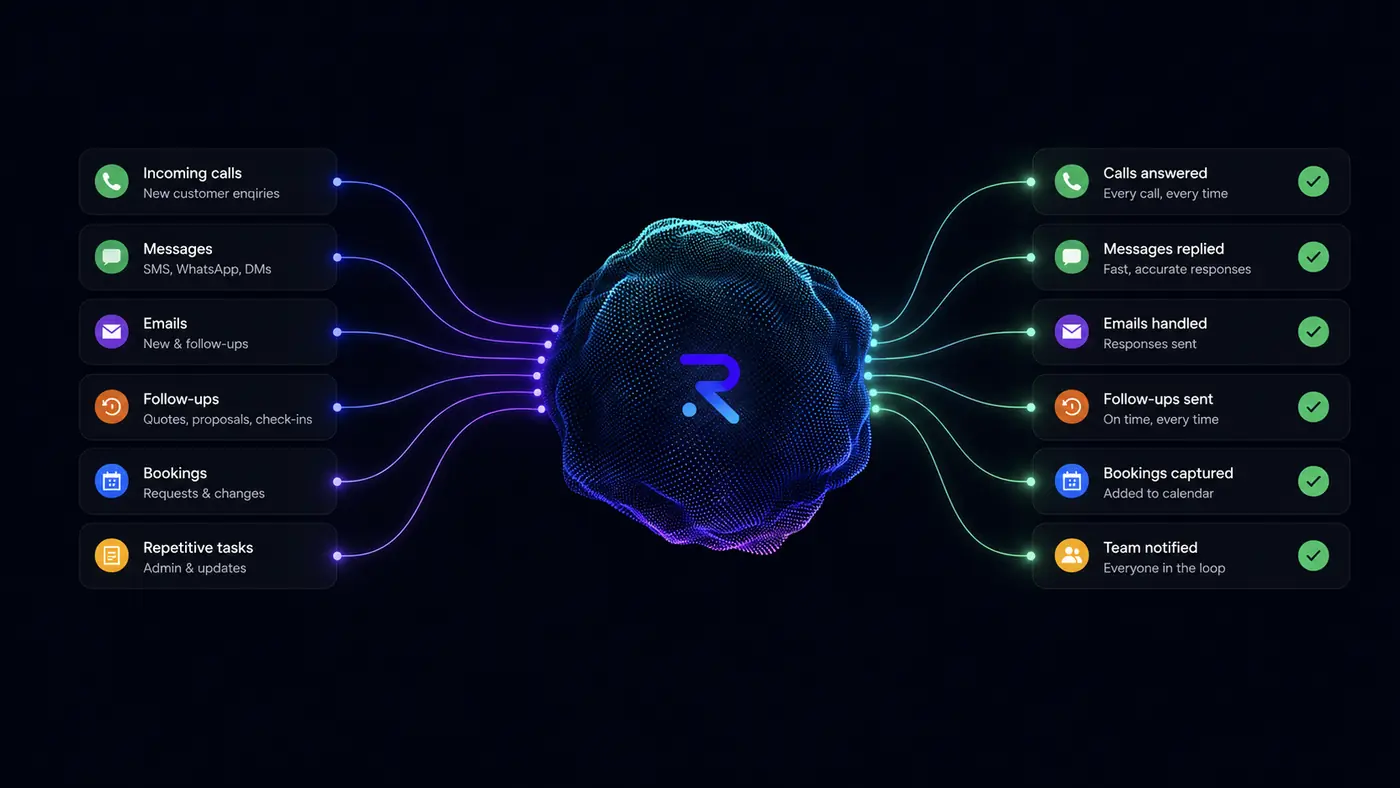
Front desk capabilities
Everything your Front Desk Agent can handle.
From the first ring to the next action, Reel AI can handle the repetitive front desk work around the conversation — while passing the moments that need a person to your team.
Answer
Be there when customers call.
- Inbound call answering
- After-hours enquiries
- Overflow calls
- Business FAQs
Understand
Know why they're calling before deciding what happens next.
- Caller intent
- Enquiry type
- Service required
- Relevant business context
Not speech to script — the purpose of the conversation is understood before the next step.
Act
Turn conversations into next steps.
- Capture customer details
- Qualify enquiries
- Create or change bookings
- Capture job details
Actions in your own software run where configured or integrated.
Route
Get the right conversations to the right people.
- Intelligent call routing
- Team and department routing
- Escalation rules
- Context-aware transfer
AI handles what it should. Your people get what actually needs them.
Record
Know what happened without replaying every conversation.
- Call history
- Call summaries
- Transcripts
- Captured information
Connect
Let the conversation continue into the rest of your business.
- Team notifications
- SMS and email follow-through
- Workflow triggers
- Communications Agent
And it's all working from the same intelligence.
One Reel AI Brain
Your business knowledge, rules and workflows.
Launch Assistant
Helps configure Reel AI around the way your business works.
Business Assistant
Gives your team access to the intelligence behind the business.
Human handoff
Routes conversations to your people when a person is actually needed.
Answering is only the beginning.
The difference is what happens after Reel AI understands why your customer called.
After the call
The conversation ends.
The work doesn't have to begin.
- 01
Call completed
The conversation ends in a natural Australian voice.
- 02
Summary created
A written summary of what was said and agreed.
- 03
Intent + details captured
Why they called, what they need, and the details that matter.
- 04
Action completed
Booking, lead, job or follow-up — where configured.
- 05
System updated
Your existing software is updated where integrated.
- 06
Team notified
The right person is told, where required.
- 07
Conversation available in Reel AI
History, summary and transcript in your dashboard.
Less "someone needs to deal with this." More "it's already handled."
Your business. Your rules.
Reel AI answers using the knowledge, workflows and routing rules configured for your business — not a generic script.
- Business hours
- Services
- Locations
- Service areas
- Team
- FAQs
- Pricing information where approved
- Booking rules
- Escalations
- Routing rules
- After-hours rules
- Customer types
Workflow
How a conversation moves.
- 01
Call arrives
- 02
Agent answers
- 03
Intent understood
- 04
Questions answered
- 05
Detail captured
- 06
Booked or routed
- 07
Team notified
Brain connection
It never works from its own assumptions.
Every answer, rule and escalation this agent applies comes from the same Reel AI Brain your other agents use. Teach it once, and the change appears everywhere.
- Phone
- SMS
- Web chat
Integrations
Keep your software. Add the intelligence.
Start with the workflow. This agent can act through the systems your business already runs where those systems support it — our engineering team assesses the available APIs and permissions before any connection is scoped.
Human handoff
It knows when to stop and pass it on.
Conversations requiring judgement, relationships or expertise are routed to the right person with the context already attached — never queued, never guessed at.
Reel AI gives good people more capacity. It doesn't replace them.
“For the first time in years, I went away without constantly checking what the office had missed. The business just kept moving.”
Priya N. · Licensee · Real Estate
What it covers
After hours, overflow, qualification and routing.
After-hours answering
Calls at 9pm on a Sunday are answered in a natural Australian voice rather than sent to voicemail. Your after-hours rules decide what gets escalated and what waits until morning.
Overflow and simultaneous callers
When your lines are busy, simultaneous callers can be answered rather than queued — so nobody rings the next business on the list.
Lead qualification
Name, number, job detail, urgency, timing and budget where relevant — captured to the standard your team needs before they pick up the conversation.
Smart routing
Live transfer, SMS and email escalation, or logged with a written summary — decided by the routing rules you set, per team, per location, per hour.
Better together
The call doesn't have to end with the Front Desk Agent.
Because Reel AI Agents share one Brain, a customer conversation can continue into the next appropriate workflow without starting again.
Front Desk Agent
Answers the inbound call, qualifies it and books or routes.
Available now
Communications Agent
Sends the confirmation and continues the conversation by message.
Available now
Business system
Relevant information is updated through a supported integration.
Where connected
New capability
More of the repetitive work will be relayed as new capability is released.
Coming soon
Your team
A human receives anything that actually needs human attention.
Always
FAQ
Common questions.
Is the Front Desk Agent available today?+
Yes — it is live with Reel AI customers and configured during onboarding by the Launch Assistant.
How does Reel AI relate to AI receptionist?+
The Front Desk Agent is the Reel AI agent people usually find when searching for AI receptionist / AI answering service. Reel AI itself is the broader agentic business communication and operations platform — this agent is one specialised part of it.
Does it use the same business knowledge as our other agents?+
Yes. Every agent draws from one Reel AI Brain, so answers, rules and routing stay consistent across channels and agents.
Can it answer after hours and handle overflow calls?+
Yes. Calls outside your hours and calls that arrive while your lines are busy are answered rather than sent to voicemail, and your after-hours rules decide what gets escalated and what waits.
Can it book, qualify, transfer and notify my team?+
It qualifies enquiries, captures details and routes or transfers to the right person with context attached. Bookings, confirmations and updates in your own software run where that system is configured or integrated; notifications by dashboard and email are standard.
Do I get summaries, transcripts and call history?+
Yes — every conversation appears in your dashboard with a summary, transcript and captured details. Recordings are available where enabled and appropriate for your business.
Does it use our business information, and can we customise how it behaves?+
It answers from the knowledge, workflows and routing rules configured for your business — hours, services, locations, service areas, team, FAQs, booking rules, escalations and after-hours rules. The Launch Assistant configures this with you, and it can be changed at any time.
What happens if the AI shouldn't handle something?+
It stops and hands the conversation to a person, with the context already attached. You set the escalation and priority rules.
How quickly can we launch?+
Most businesses are live within days. Setup time depends on how much business knowledge and how many integrations you want configured up front.
Are integrations part of this agent?+
No. Connections are assessed separately. Tell us the workflow you want handled and our engineers assess what your existing software supports before anything is scoped.
Curious how this would run in your business?
One platform
Meet the other Reel AI Agents.
Communications Agent
Available nowOne intelligent conversation across the channels your customers already use.
Business Assistant
Available nowAsk your business questions and get answers from the same intelligence powering your agents.
Launch Assistant
Available nowGets Reel AI ready around the way your business actually works.
Give your team their attention back.
See what Reel AI could relay for your business.
- 7-day risk-free trial
- No setup fee
- Cancel anytime